Since the last post, I’ve been immersed in the first stage of the project: research and literature review. Spatial audio is not a new topic, and therefore, I wanted to analyze the existing methods that are already existed. During these days, I’ve been reviewing paper and websites,
Let’s have a look at what I found:
Technology
I found several existing encoder technologies! It can help you combine ambisonics and 360 videos!
Works Plugin + G’Audio Works Encoder (G’Audio)[1]:
- Spatial audio input formats: GA5, FOA, head-locked stereo
- Output destinations: Youtube, Facebook, G’Player for Gear VR
As for software, G’Audio Lab has produced a free and very intuitive spatial plugin called “Works” that integrates seamlessly with 360 videos within Pro Tools.
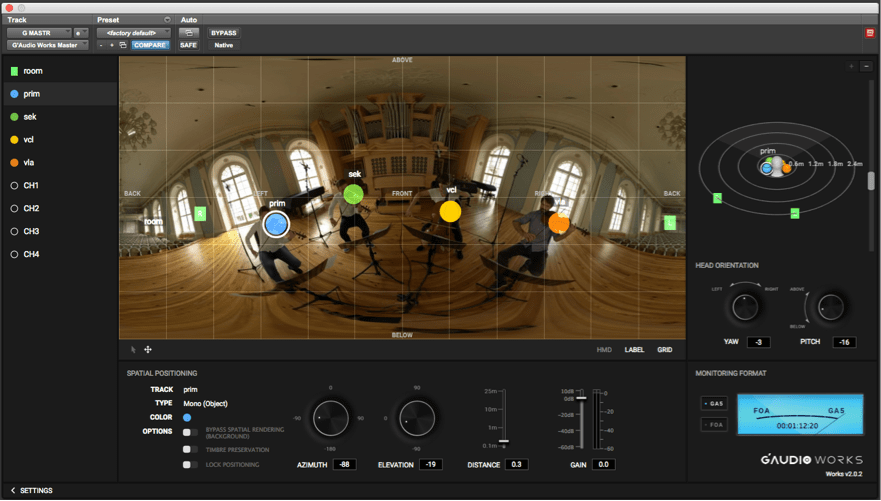
G’Audio Works lets you place objects and ambisonic tracks directly on a quicktime video to easily synchronize locations of sounds.
The audio tracks in your Pro Tools session will appear in Works with object-based controls such as azimuth (lateral position), elevation (height position) and distance. When moving the colorful dots on the screen, the positioning parameters are taken care of with single movements.
FB360 Encoder [3]:
- Spatial audio input formats: FOA, 2OA, head-locked stereo
- Output destinations: Youtube, Facebook, Oculus video
Here is an introduction video for the 360 Spatial Workstation
In the Facebook 360 Spatial Workstation official website[3], they introduce that:” the 360 spatial Workstation is a software suite for designing spatial audio for 360 video and cinematic VR. It includes plugins for popular audio workstations, a time synchronized 360 video player and utilities to help design and publish spatial audio in a variety of formats. Audio produced with the tools can be experienced on Facebook News Feed on Android and iOS devices, Chrome for desktop and the Samsung Gear VR headset through headphones.”
Here is a video to use 360 Spatial Workstation with Reaper
Spatial Media Metadata Injector (YouTube)[4]
- Spatial audio input formats: FOA
- Output destinations: YouTube
Here is an instructions about how to use spatial audio in 360-degree and VR videos in YouTube: https://support.google.com/youtube/answer/6395969?hl=en
We can choose Reaper for the DAW tool in the YouTube platform, to combine 360-degree and VR videos and ambisonics.
Here is a good example teach you how to upload videos with spatial audio in YouTube:
360° Ambisonics Tools in Waves[5]:
The Waves B360 plugin can help us to convert stereo and surround to Ambisonics B-format, mix B-format audio, and monitor it in high fidelity on our regular stereo headphones. It has mono, stereo, 5.1 and 7.1 components that encode the input onto B-format, with controls which allow people to position (pan) each element in the sound-field.
The Waves company also create:
Nx Virtual Mix Room: Use this plugin to monitor your B-format mix on any pair of standard stereo headphones, with professional audio quality that doesn’t color your sound. Simply insert the plugin’s Nx Ambisonics component on the buss you wish to monitor, and send it to your regular headphones.
Nx Head Tracker: This small Bluetooth device enhances the 360° realism of the Nx plugin by tracking your head movements with full precision.
Here is a video to introduce the plugins of waves:
Media requirements
Due to my project almost for the YouTube, so I founded the minimum requirements for spatial audio in YouTube.
The website[4] quote that:
- “Metadata is added to your file.
- Either use the metadata tool or your own post-production tools that meet the YouTube spec
- Only one audio track is used.
- Multiple audio tracks, such as tracks with spatial and stereo/mono audio in the same file, are not supported
- Spatial audio uses Ambisonics (AmbiX) format:
- ACN channel ordering
- SN3D normalization
- Supported First Order Ambisonics (FOA) formats:
- W, Y, Z, X as a 4-channel audio track in your uploaded file, sample rate: 48 kHz
- PCM encoded audio in a MOV container:
- AAC encoded audio in a MP4/MOV container:
- Min. bitrate: 256 kbps
- OPUS encoded audio in an MP4 container:
- Channel mapping family: 2
- Min. bitrate 512 kbps
- Supported First Order Ambisonics (FOA) with Head-Locked Stereo format:
- W, Y, Z, X, L, R as a 6-channel audio track in your uploaded file, sample rate: 48 kHz
- PCM encoded audio in a MOV container:
- Sample rate: 48 kHz
- OPUS encoded audio in an MP4 container:
- Min. bitrate 768 kbps
- Channel mapping family: 2.”
Reading
I read the ‘Auditory spatial perception:auditory localization‘ [6]this week. I think this book has made me understand the development of localization overall, and laid the foundation for the listening test I will do later.
The elements may affect localization listening test:
1.Monaural spectral cues
2.Head movement
3.Tested visual effect
4.Sound Onset Precedence Effect
5.Other factors (hearing loss of the tested person, age ( the mixed effects of age-related hearing loss), gender, this book says that it is more difficult for women to locate the sound source in a noisy environment
I also read ‘Auditory Localisation in Low-Bitrate Compressed Ambisonic Scenes’[7]. In the paper, This author describes localisation decided by OPUS bit-rate to some degree. The accuracy of localisation will decline following low-bit-rate compression. Moreover, the accuracy of localisation decided by Ambisonic order because higher ambisonic order has more accurate localisation resolution.
In the Media part, we have questions with higher order Ambisonics.
After reading, we can understand the higher order Ambisonics can give higher accuracy of localization.
And my Approach?
I’m also going to use some system or encoders to control spatial audio, but my approach will be slightly different. In my method, I am going to explore the different order ambisonic localisation/audio quality in different contexts, such as VR gaming, immersive music)
This week, I will meet my supervisor to talk about how to achieve the decoder the audio and combine with different contexts. Next week, I’m going to write a post sharing my thoughts in listening test. If you have any questions do not hesitate just comment or email me!!
Conclusion:
After this extensive review, (not just what I posted here) I realized that the spatial audio is widely researched by lots of companies and University research groups. Now, the Youtube platform only uses the First-order in ambisonic. But in the research of Rudzki, Tomasz [7] has found the relationship between ambisonic order, OPUS bit-rate, and localisation accuracy. I may consider combining different ambisonic orders with different topic videos (VR game, VR presentation…) in the after weeks.
Reference list
[1]Gaudio Lab. (n.d.). WORKS Plugin. [online] Available at: <https://gaudiolab.com/tech-works-plugin/ >[Accessed 16 May 2020].
[2]Gaudiolab (n.d.). Works spatial plugin. Available at:< https://gaudiolab.com/ >[Accessed 6 May 2020].
[3]Fb.com. (2019b). Spatial Workstation. [online] Available at: https://facebook360.fb.com/spatial-workstation/.
[4]support.google.com. (n.d.). Use spatial audio in 360-degree and VR videos – YouTube Help. [online] Available at: <https://support.google.com/youtube/answer/6395969?hl=en> [Accessed 16 May 2020].
[5]waves.com. (2020). 360° Ambisonics Tools. [online] Available at: <https://www.waves.com/hardware/360-ambisonics-tools> [Accessed 16 May 2020].
[6]Letowski, Tomasz R., and Szymon T. Letowski. “Auditory Spatial Perception: Auditory Localization.” Apps.Dtic.Mil, 1 May 2012, apps.dtic.mil/docs/citations/ADA563540. Accessed 12 May 2020.
[7]Rudzki, Tomasz, et al. “Auditory Localization in Low-Bitrate Compressed Ambisonic Scenes.” Applied Sciences, vol. 9, no. 13, 28 June 2019, p. 2618, 10.3390/app9132618. Accessed 12 May 2020.

